
Skip to content
View in the app

A better way to browse. Learn more.

Flight Sim Labs Forums

A full-screen app on your home screen with push notifications, badges and more.

To install this app on iOS and iPadOS
  1. Tap the Share icon in Safari
  2. Scroll the menu and tap Add to Home Screen.
  3. Tap Add in the top-right corner.
To install this app on Android
  1. Tap the 3-dot menu (⋮) in the top-right corner of the browser.
  2. Tap Add to Home screen or Install app.
  3. Confirm by tapping Install.

StreamDeck Profile for the old SKALARKI ADIRS Panel plus a functioning 100/1000ft Switch 1.0.0

(0 reviews)

2 Screenshots

Hi!

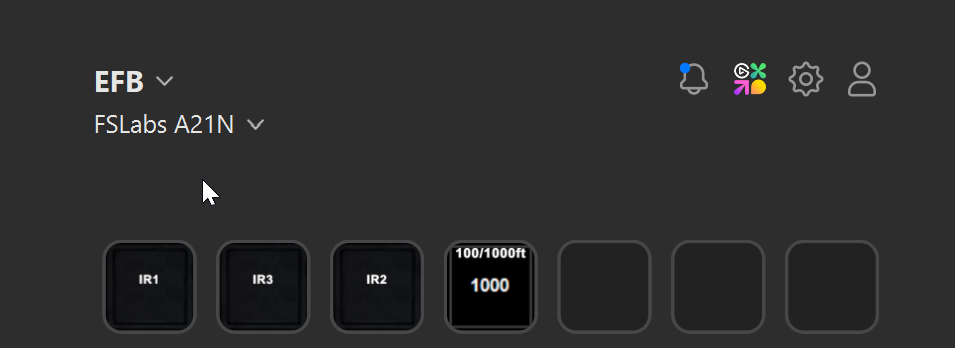
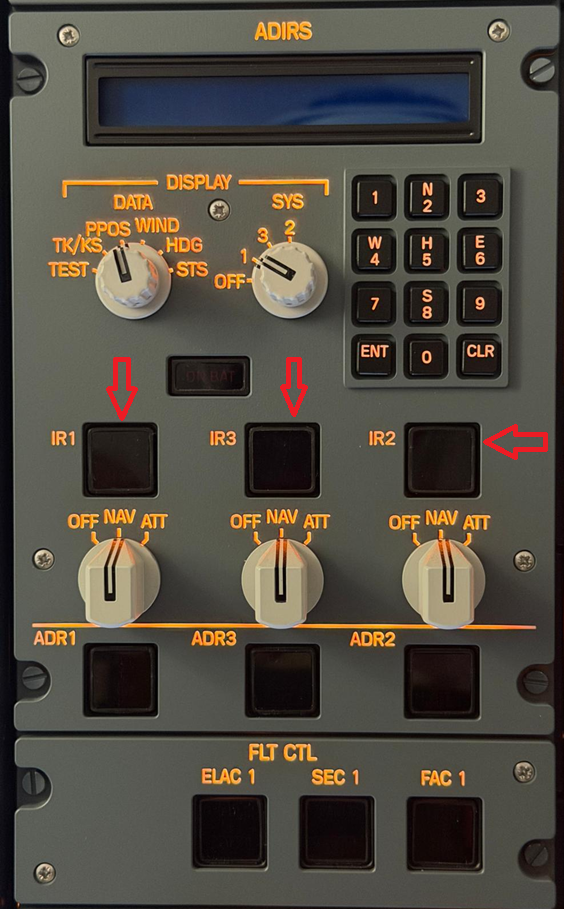
This Stream Deck profile is made for Skalarki Homecockpit users who are still using an old ADIRS panel, that is not fully compatible with the new ADIRS NEO panel, used by the FSLabs A21N.
The IR1, IR2 and IR3 are not clickable in the old panel, also the 100/1000ft switch in the FCU is always in the wrong position if you load the airplane.

With this Stream Deck profile, you can easily control these switches without jumping back into the virtual cockpit, allowing for a more seamless experience.

Have fun!

User Feedback

There are no reviews to display.

Account

Navigation

Search

Search

Configure browser push notifications

Chrome (Android)
  1. Tap the lock icon next to the address bar.
  2. Tap Permissions → Notifications.
  3. Adjust your preference.
Chrome (Desktop)
  1. Click the padlock icon in the address bar.
  2. Select Site settings.
  3. Find Notifications and adjust your preference.