
Skip to content
View in the app

A better way to browse. Learn more.

Flight Sim Labs Forums

A full-screen app on your home screen with push notifications, badges and more.

To install this app on iOS and iPadOS
  1. Tap the Share icon in Safari
  2. Scroll the menu and tap Add to Home Screen.
  3. Tap Add in the top-right corner.
To install this app on Android
  1. Tap the 3-dot menu (⋮) in the top-right corner of the browser.
  2. Tap Add to Home screen or Install app.
  3. Confirm by tapping Install.

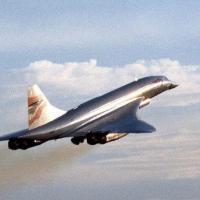
Pre-Production Concorde G-AXDN v2.1

This is Concorde G-AXDN, the Concorde which achieved the legendary Mach 2.22 in flight testing, making it a record holder in the area of pure speed. This file includes: The repaint texture folder, and an aircraft.cfg guidance file. This repaint was originally made by Hightower; however, the textures were low quality and didn't work properly on most computers. Therefore, I decided to enhance his textures for increased resolution as well as compatibility. Enjoy!

What's New in Version v2

Released

  • Textures completely redone for added quality
  • Install process simplified

Account

Navigation

Search

Search

Configure browser push notifications

Chrome (Android)
  1. Tap the lock icon next to the address bar.
  2. Tap Permissions → Notifications.
  3. Adjust your preference.
Chrome (Desktop)
  1. Click the padlock icon in the address bar.
  2. Select Site settings.
  3. Find Notifications and adjust your preference.