
Skip to content
View in the app

A better way to browse. Learn more.

Flight Sim Labs Forums

A full-screen app on your home screen with push notifications, badges and more.

To install this app on iOS and iPadOS
  1. Tap the Share icon in Safari
  2. Scroll the menu and tap Add to Home Screen.
  3. Tap Add in the top-right corner.
To install this app on Android
  1. Tap the 3-dot menu (⋮) in the top-right corner of the browser.
  2. Tap Add to Home screen or Install app.
  3. Confirm by tapping Install.

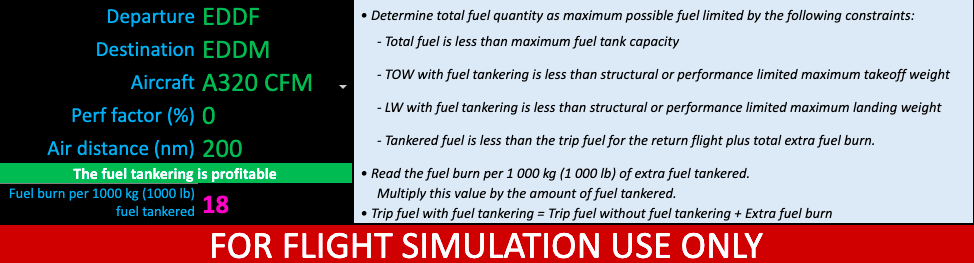
Fuel Tankering Calculator 1.0.0

Based on the FCOM tables of a particular airplane and might not coincide with the data of MSN modeled by FSLabs. MS Excel REQUIRED

A319 IAE is missing due to lack of data. For any questions/suggestions feel free to contact me by PM.
What's New in Version 1.0.0

Released

Based on the FCOM tables of a particular airplane and might not coincide with the data of MSN modeled by FSLabs. MS Excel REQUIRED

Fuel prices are taken from US Energy Information Administration estimations and might be incorrect. Manual entering of the prices also possible.

A319 IAE is missing due to lack of data.

For any questions/suggestions feel free to contact me by PM.

TCP.png.60cb36dbf3b7735a03c6ce641b11f0cf.png

With version 1.0.0:

Account

Navigation

Search

Search

Configure browser push notifications

Chrome (Android)
  1. Tap the lock icon next to the address bar.
  2. Tap Permissions → Notifications.
  3. Adjust your preference.
Chrome (Desktop)
  1. Click the padlock icon in the address bar.
  2. Select Site settings.
  3. Find Notifications and adjust your preference.

