
Skip to content
View in the app

A better way to browse. Learn more.

Flight Sim Labs Forums

A full-screen app on your home screen with push notifications, badges and more.

To install this app on iOS and iPadOS
  1. Tap the Share icon in Safari
  2. Scroll the menu and tap Add to Home Screen.
  3. Tap Add in the top-right corner.
To install this app on Android
  1. Tap the 3-dot menu (⋮) in the top-right corner of the browser.
  2. Tap Add to Home screen or Install app.
  3. Confirm by tapping Install.

Lufthansa A319 D-AIBA 1.1.0

(5 reviews)

1 Screenshot

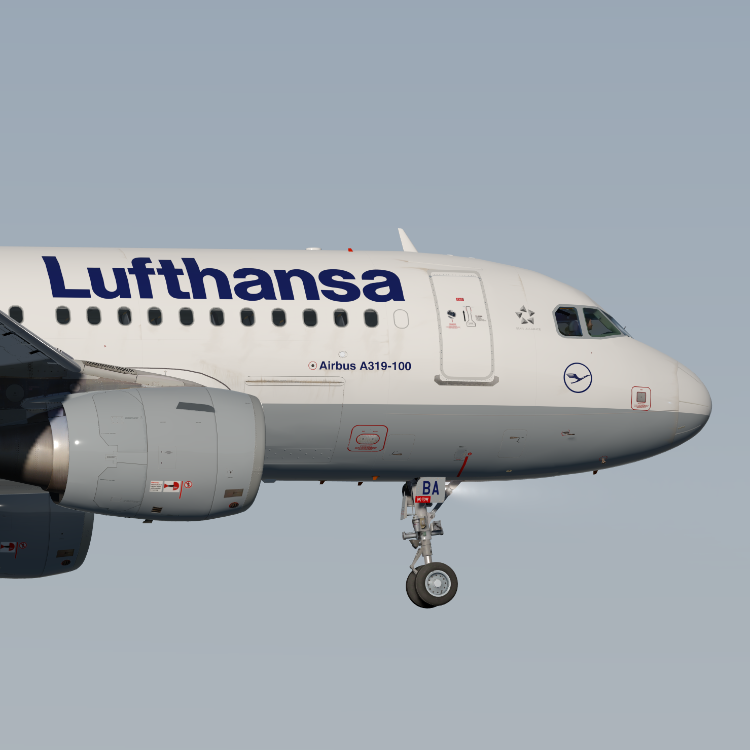
Lufthansa A319 D-AIBA 

This livery features a realistic replica of the real D-AIBA including:

  • Custom made weathering textures, the correct Lufthansa wings and completely reworked windows to fit the real Airbus windows.
  • To install extract the livery inside : 
    Users\<name>\Documents\Prepar3d v4/5 Add-ons\FSLabs\SimObjects\Airplanes\FSLabs A319 CFM\

These liveries take up a lot of time, so if you like my work and would like to support me, feel free to visit this page:

Paypal

KBnuGL9.png


Note this livery is only for v5.0.1.114+

YOU ARE NOT ALLOWED TO UPLOAD MY TEXTURES ANYWHERE WITHOUT MY PERMISSION!!!

What's New in Version 1.0.1

Released

- corrected door shape

User Feedback

Tobias Schock

Tobias Schock


Thank you so much for the great repaint!
6/5 stars. 

Greetings

Sebastian Brabsche

Sebastian Brabsche


Great, thank you for that!

I like the Dirty look.

Pascal Blau

Pascal Blau

   2 of 2 members found this review helpful 2 / 2 members

It won´t let me give u more than 5 stars !

Response from the author:

Thank you!! :D

Rafal Haczek

Rafal Haczek

   2 of 2 members found this review helpful 2 / 2 members

That is simply a masterpiece, Florian!
I reward you with the Golden Paintbrush.
 

gpaint_S.jpg

Response from the author:

Thanks a lot Rafal! and how cool is that award!! :lol: I love it:lol:

Benjamin Moeller

Benjamin Moeller

   1 of 1 member found this review helpful 1 / 1 member

Best execution of the texture I've seen so far. Razor sharp surface. The windows are a dream. 10 out of 10 stars !!!! Many Thanks :o

Response from the author:

Thank you! :)) 

Account

Navigation

Search

Search

Configure browser push notifications

Chrome (Android)
  1. Tap the lock icon next to the address bar.
  2. Tap Permissions → Notifications.
  3. Adjust your preference.
Chrome (Desktop)
  1. Click the padlock icon in the address bar.
  2. Select Site settings.
  3. Find Notifications and adjust your preference.

