
Skip to content
View in the app

A better way to browse. Learn more.

Flight Sim Labs Forums

A full-screen app on your home screen with push notifications, badges and more.

To install this app on iOS and iPadOS
  1. Tap the Share icon in Safari
  2. Scroll the menu and tap Add to Home Screen.
  3. Tap Add in the top-right corner.
To install this app on Android
  1. Tap the 3-dot menu (⋮) in the top-right corner of the browser.
  2. Tap Add to Home screen or Install app.
  3. Confirm by tapping Install.

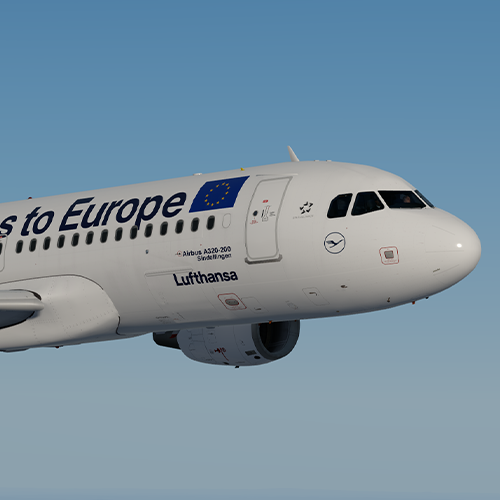
Lufthansa 'Say yes to Europe' A320 D-AIZG 1.0.3

(3 reviews)

1 Screenshot

ONLY FOR A320 v5.0.100+

Lufthansa 'Say yes to Europe' A320-214 D-AIZG

Installation instructions:

  • Simply drag both the 'Texture.DLH D-AIZG' AND 'Airframe Configs' folders into your FSLabs A320 CFM simobjects folder (usually found at 'Documents\Prepar3D v4/5 Add-ons\FSLabs\SimObjects\Airplanes\FSLabs A320 CFM').

Features a complete overhaul of the default FSL A320 paint kit including:

  • Custom 4K textures with accurate seam panelling, fuselage section joins and rivets.
  • Custom 4K metallic maps (PBR) with baked ambient occlusion (AO) effects.
  • Custom 4K normal maps for fuselage, engines, wings and tail.
  • Reworked landing gear including tyres and struts with custom PBR effects.
  • Enhancements to aircraft overlay textures, including PBR effects.
  • Custom dirt effects.


Special thanks to @Hugo Bicho @Daniel Du Preez and @John Tavendale for the custom 4K A320 Paintkit.

Creating these paints takes a lot of time so a donation is greatly appreciated! - https://www.paypal.me/outwithnade

Hap1Jwe.png

What's New in Version 1.0.2

Released

  • Adjusted fuse 3/tail section.
  • Updated wing textures and overlays.
  • General colour improvements.

User Feedback

Marioja

Marioja


Ich schreibe zuerst in deutsch: super Textur. Hat jetzt erst alles funktioniert. Hinweis an alle, wirklich Schritt für Schritt genau lesen, dann hat man die Texturen auch in seinem P3D4.5 . Die Installation ist nicht direkt im Simulationsprogramm, nur als Gedanke. Viel Spaß noch an alle.

The textur is beautiful. Please read step vor step, then it is really running.  Have fun, it is very good.

Sam Kharey

Sam Kharey

   2 of 2 members found this review helpful 2 / 2 members

Elliot thank you for the ongoing updates and keeping these impeccable birds in tiptop  shape.

Morgan Western

Morgan Western

   1 of 1 member found this review helpful 1 / 1 member

Very good livery again Elliot!

Good work!

Account

Navigation

Search

Search

Configure browser push notifications

Chrome (Android)
  1. Tap the lock icon next to the address bar.
  2. Tap Permissions → Notifications.
  3. Adjust your preference.
Chrome (Desktop)
  1. Click the padlock icon in the address bar.
  2. Select Site settings.
  3. Find Notifications and adjust your preference.

