
Skip to content
View in the app

A better way to browse. Learn more.

Flight Sim Labs Forums

A full-screen app on your home screen with push notifications, badges and more.

To install this app on iOS and iPadOS
  1. Tap the Share icon in Safari
  2. Scroll the menu and tap Add to Home Screen.
  3. Tap Add in the top-right corner.
To install this app on Android
  1. Tap the 3-dot menu (⋮) in the top-right corner of the browser.
  2. Tap Add to Home screen or Install app.
  3. Confirm by tapping Install.

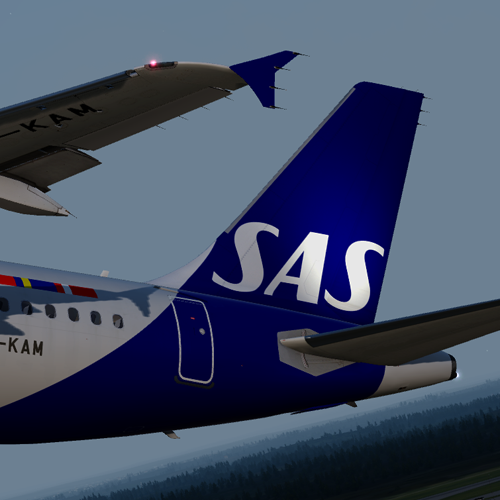
SAS Scandinavian A320 OY-KAM 1.6.0

(10 reviews)

1 Screenshot

ONLY FOR V.2.0.2.300+

SAS Scandinavian Airlines New Livery A320-232 OY-KAM

Will update when more photos of the aircraft become available

by outwithnade

OY-KAM_Screenshot.png

What's New in Version 1.5.0

Released

  • Remade on new paintkit (Thanks to Hugo Bicho for his 320 Paintkit)
  • Other minor fixes to fuse and wing.

User Feedback

Erik Calmfors

Erik Calmfors


Works fine but would work even better if it was updated to fit latest version of the A320.

Darius Wahab

Darius Wahab

   0 of 1 member found this review helpful 0 / 1 member

Its amazing but the logo on the tail is no equal. 

Matei Cojocaru

Matei Cojocaru

   1 of 1 member found this review helpful 1 / 1 member

Fantastic livery!

Nicolaus Malmgren

Nicolaus Malmgren

   0 of 1 member found this review helpful 0 / 1 member

Very nice paint. However i think the blue on the front engines is missing here. Please see the A321 for example.

Thanks a lot...

Nicolaus Malmgren

Morgan Western

Morgan Western

   1 of 1 member found this review helpful 1 / 1 member

very nice livery! It does look really nice the new SAS livery especially during the winter,

Amazing as always!

Wych!

David Norfolk

David Norfolk

   1 of 1 member found this review helpful 1 / 1 member

Favorite Paint <3 thanks man  

Samuel May

Samuel May

   2 of 2 members found this review helpful 2 / 2 members

Can't wait to fly it on Tuesday <3

Sveinung Kaurstad

Sveinung Kaurstad

   2 of 2 members found this review helpful 2 / 2 members

Amazing as always!


Thanks for making the new SAS Livery :wub:

Response from the author:

Thanks, Sveinung! :)

Harry Twine

Harry Twine

   2 of 2 members found this review helpful 2 / 2 members

Great Livery :)

Artur Araripe

Artur Araripe

   1 of 1 member found this review helpful 1 / 1 member

Fantastic as usual! 

Account

Navigation

Search

Search

Configure browser push notifications

Chrome (Android)
  1. Tap the lock icon next to the address bar.
  2. Tap Permissions → Notifications.
  3. Adjust your preference.
Chrome (Desktop)
  1. Click the padlock icon in the address bar.
  2. Select Site settings.
  3. Find Notifications and adjust your preference.

