

Random payload generator in Excel format.
Choose aircraft, config and purpose of flight and hit the button. (Be sure to activate macros).
The purpose will influence the minimum amount of passengers (less chance of a half empty plane on a holiday flight) and the bags (pieces) per passenger (might be more than one per pax on an holiday flight & not every one on a business trip is checking baggage in etc.).
Passenger weight: 84kg
Bag weight: 17kg
Male/Female/Child distribution just for immersion, does not affect total passenger weight.
What's New in Version 2.0.
Released
Changelog v2.0:
- New layout optimized for A4 printing and visually more like OFP layouts
- Added additional basic information fields to fill out
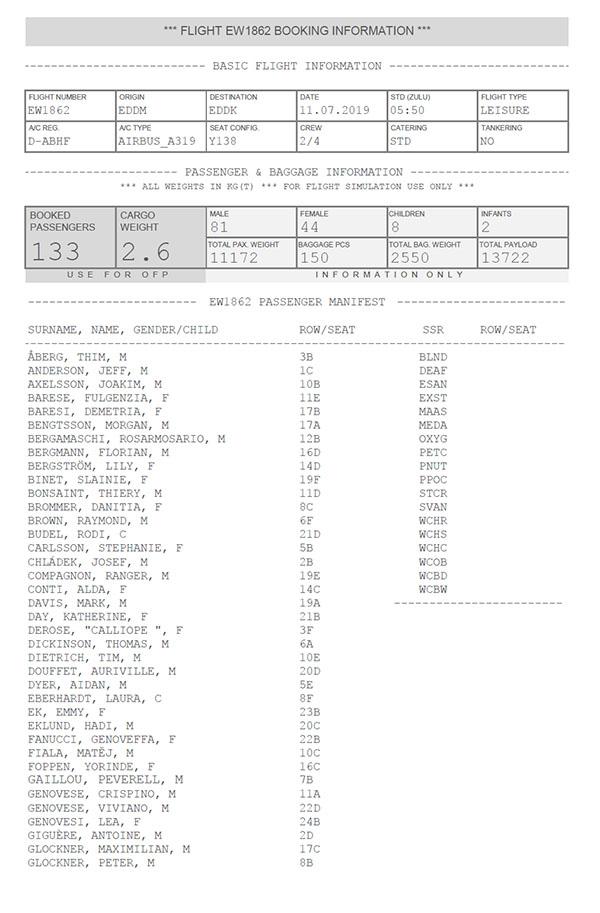
- Added passenger manifest:
Passenger list is randomly and dynamically created from 1.500 random names and listed alphabetically.
The amount of female (F), male (M) and child (C) passengers in list matches figures in the payload section
Disclaimer: Any resemblance to actual persons, living or dead, is purely coincidental!
- Added seat assignments:
Seat/row numbers are created dynamically depending on seat config field in basic section.
Seats are randomly distributed to passenger list, empty seats are not shown.
- Added automatic PDF function (button)
- Added SSR section (not yet functional)
Hope you guys like it 
-
 7
7
-
 4
4