
Skip to content
View in the app

A better way to browse. Learn more.

Flight Sim Labs Forums

A full-screen app on your home screen with push notifications, badges and more.

To install this app on iOS and iPadOS
  1. Tap the Share icon in Safari
  2. Scroll the menu and tap Add to Home Screen.
  3. Tap Add in the top-right corner.
To install this app on Android
  1. Tap the 3-dot menu (⋮) in the top-right corner of the browser.
  2. Tap Add to Home screen or Install app.
  3. Confirm by tapping Install.

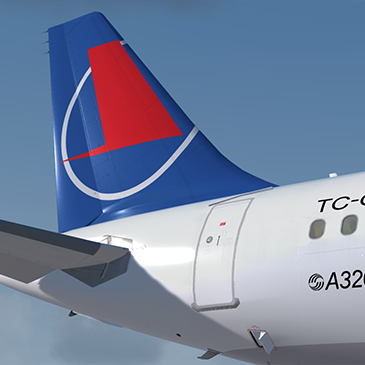
Onur Air A320 TC-OBU 1.1

(2 reviews)

1 Screenshot

P3Dv4 v2.0.2.300+ ONLY.

You can simply drop the 'Texture.OHY TC-OBU' folder into your sim and the aircraft will automatically be added to the vehicles list.

This livery is based off the real world Onur Air livery, Reg : TC-OBU. 

Credits:

Credit goes to John Tavendale for the use of some of his A320 files.
Hugo Bicho for the use of his base aircraft files for the IAE.

Any issues, PM me or email me on my website : www.7x7pilot.weebly.com

OBU Thumb.png

What's New in Version 1.1

Released

FIXED SPEC FILES

User Feedback

Viacheslav Gorovoi

Viacheslav Gorovoi


Very soulful work! Keep going...

397.thumb.jpg.1774ce489dcc1d08ff5517c1125c8e46.jpg

K. Serhan Onur

K. Serhan Onur


Is this texture with CFM? Cos. TC-OBU has got IAE engines.

Account

Navigation

Search

Search

Configure browser push notifications

Chrome (Android)
  1. Tap the lock icon next to the address bar.
  2. Tap Permissions → Notifications.
  3. Adjust your preference.
Chrome (Desktop)
  1. Click the padlock icon in the address bar.
  2. Select Site settings.
  3. Find Notifications and adjust your preference.

