
Skip to content
View in the app

A better way to browse. Learn more.

Flight Sim Labs Forums

A full-screen app on your home screen with push notifications, badges and more.

To install this app on iOS and iPadOS
  1. Tap the Share icon in Safari
  2. Scroll the menu and tap Add to Home Screen.
  3. Tap Add in the top-right corner.
To install this app on Android
  1. Tap the 3-dot menu (⋮) in the top-right corner of the browser.
  2. Tap Add to Home screen or Install app.
  3. Confirm by tapping Install.

Edelweiss Air A320 CFM HB-JJM 2.0.1

(1 review)

1 Screenshot

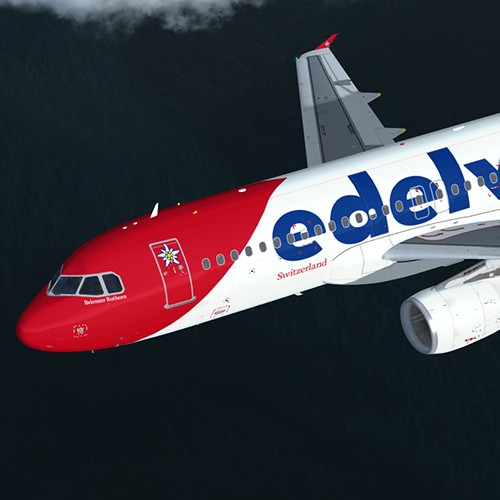
Edelweiss Air Airbus A320 (Brienzer Rothorn, HB-JJM)

The download contains a repaint of a Edelweiss Air Airbus A320 (Brienzer Rothorn, HB-JJM).
Repaint comes with customized and reworked fuselage, engine and wing textures (including bump and specular maps).
For installation instructions check the included readme.txt.

Creating liveries takes lots of time and effort. If you consider a donation, please visit paypal.me/mcnobody. Thanks!

Note: FSL A320-X version 2.0.2.300 or higher required. This repaint is optimised for PREPAR3D v4.5 and compatible with Tomatoshade or other shader tools.


What's New in Version 2.0.0

Released

  • Reworked fuselagen, engine and wing textures.
  • Reworked specular and bump maps.

User Feedback

Hendrik Schall

Hendrik Schall

   1 of 1 member found this review helpful 1 / 1 member

Looks very good!

Account

Navigation

Search

Search

Configure browser push notifications

Chrome (Android)
  1. Tap the lock icon next to the address bar.
  2. Tap Permissions → Notifications.
  3. Adjust your preference.
Chrome (Desktop)
  1. Click the padlock icon in the address bar.
  2. Select Site settings.
  3. Find Notifications and adjust your preference.
