
Skip to content
View in the app

A better way to browse. Learn more.

Flight Sim Labs Forums

A full-screen app on your home screen with push notifications, badges and more.

To install this app on iOS and iPadOS
  1. Tap the Share icon in Safari
  2. Scroll the menu and tap Add to Home Screen.
  3. Tap Add in the top-right corner.
To install this app on Android
  1. Tap the 3-dot menu (⋮) in the top-right corner of the browser.
  2. Tap Add to Home screen or Install app.
  3. Confirm by tapping Install.

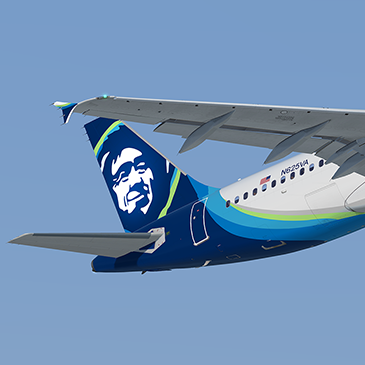
Alaska A320 N625VA 1.0.0

(4 reviews)

1 Screenshot

Repaint of Alaska A320 N625VA

P3Dv4 v2.0.2.300+ ONLY. You can simply drop the Texture.XXX folder into your sim and the aircraft will automatically be added to the vehicles list.

Created using highly detailed custom paint kit. 

If you like this paint and my other work then why not shout me a beer or cup of coffee?
https://www.paypal.me/texturesbytavers


N625VA.png

What's New in Version 1.0.0

Released

No changelog available for this version.

User Feedback

Matthew Ashwood

Matthew Ashwood


Textures by Tavers are my go to for any repaint, this Alaska repaint is amazing just like his others! If I could rate this more than 5 stars I would!!

marco bologna

marco bologna


complimenti ottimo lavoro


David Murden

David Murden

   2 of 2 members found this review helpful 2 / 2 members

Although I should like the BA livery’s or another British base carrier like EasyJet best. This livery is just stunning.

Currently my favourite. With FlyTampa new KLAS giving more reasons to use it.

Alexander Lynskey

Alexander Lynskey

   3 of 6 members found this review helpful 3 / 6 members

Good livery - nice textures and replicates the real aircraft quite well.

Only problem is that included weights within the texture.cfg are in metric, whereas it is a US registered aircraft and uses imperial. This is despite the included options indicating that the aircraft uses lbs. 

Response from the author:

The weights are added when you launch the sim and use KG as default. It's not hard change them yourself.

Account

Navigation

Search

Search

Configure browser push notifications

Chrome (Android)
  1. Tap the lock icon next to the address bar.
  2. Tap Permissions → Notifications.
  3. Adjust your preference.
Chrome (Desktop)
  1. Click the padlock icon in the address bar.
  2. Select Site settings.
  3. Find Notifications and adjust your preference.

