Skip to content
View in the app

A better way to browse. Learn more.

Flight Sim Labs Forums

A full-screen app on your home screen with push notifications, badges and more.

To install this app on iOS and iPadOS
  1. Tap the Share icon in Safari
  2. Scroll the menu and tap Add to Home Screen.
  3. Tap Add in the top-right corner.
To install this app on Android
  1. Tap the 3-dot menu (⋮) in the top-right corner of the browser.
  2. Tap Add to Home screen or Install app.
  3. Confirm by tapping Install.

My Homecockpit: Powered by FSLabs since 2020 (and SKALARKI)

Featured Replies

Proudly presenting an update on my Homecockpit project
 

So far its still based on P3D but I'm hoping to finally bring it to the MSFS platform! But still have to wait for the Skalarki Interface and for the release of the 320 version....
Also Ihm think about getting a new hardware system (so far I'm using MSI PRO Z690-A motherboard, i7 12700K, 32GB DDR5 RAM, GeForce RTX 3080, GeForce 1060, M.2 1TB SSD)

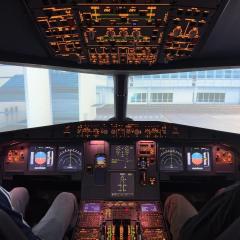
IMG_6275.jpg

IMG_3357.jpg

IMG_2374.jpg

Great set up Jan 

Join the conversation

You can post now and register later. If you have an account, sign in now to post with your account.

Guest
Reply to this topic...

Account

Navigation

Search

Search

Configure browser push notifications

Chrome (Android)
  1. Tap the lock icon next to the address bar.
  2. Tap Permissions → Notifications.
  3. Adjust your preference.
Chrome (Desktop)
  1. Click the padlock icon in the address bar.
  2. Select Site settings.
  3. Find Notifications and adjust your preference.