

Skip to content
View in the app

A better way to browse. Learn more.

Flight Sim Labs Forums

A full-screen app on your home screen with push notifications, badges and more.

To install this app on iOS and iPadOS
  1. Tap the Share icon in Safari
  2. Scroll the menu and tap Add to Home Screen.
  3. Tap Add in the top-right corner.
To install this app on Android
  1. Tap the 3-dot menu (⋮) in the top-right corner of the browser.
  2. Tap Add to Home screen or Install app.
  3. Confirm by tapping Install.

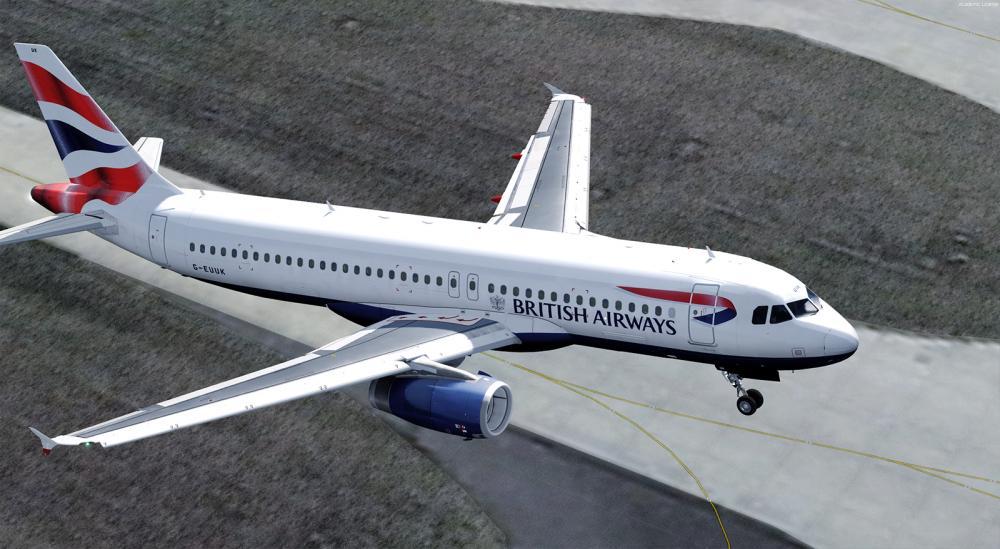
British Airways | G-GATL | A320-232 | IAE V2527-A5 1.0.0

(10 reviews)

1 Screenshot

Repainted almost entirely by scratch. Custom made photo-realistic wing, fuse, engine, tail and wing textures. All new bump and specular maps.Tiny details such as nose cone varieties and actual aircraft marks have been added to create the ultimate realism.


User Feedback

Cameron Taylor

Cameron Taylor

   0 of 2 members found this review helpful 0 / 2 members

Hey! Looks really nice, however when I drag the texture.G-GATL file into the IAE folder, it comes up in P3D as a black fuselage, with a white tail. Any fixes?

planebug.PNG

Toby Mason

Toby Mason

   1 of 1 member found this review helpful 1 / 1 member

Its a brilliant repaint, almost identical to the real Gatwick-based A320s. Great work!

David Murden

David Murden

   4 of 4 members found this review helpful 4 / 4 members

The best i've seen. Thank you.

Steve Weeks

Steve Weeks

   1 of 1 member found this review helpful 1 / 1 member

Excellent! Thank you for the repaint.

Wayne George

Wayne George

   1 of 1 member found this review helpful 1 / 1 member

We definitely need more repaints like this mate, Nice work!!!!

Ryan Perry

Ryan Perry

   3 of 3 members found this review helpful 3 / 3 members

Amazing! Its Superb

Björn Brouns

Björn Brouns

   1 of 1 member found this review helpful 1 / 1 member

Beautiful !!!

Sam Kharey

Sam Kharey

   3 of 3 members found this review helpful 3 / 3 members

This is one of the highest fidelity repaints out there. Crisp, authentic and detailed, these BA birds are a work of art. Ben, been following your work for years and can’t wait to see what’s next.

Jamie Whiting

Jamie Whiting

   2 of 2 members found this review helpful 2 / 2 members

Superb

Matej Stavanja

Matej Stavanja

   2 of 2 members found this review helpful 2 / 2 members

Ben, these are the best liveries to date!

Account

Navigation

Search

Search

Configure browser push notifications

Chrome (Android)
  1. Tap the lock icon next to the address bar.
  2. Tap Permissions → Notifications.
  3. Adjust your preference.
Chrome (Desktop)
  1. Click the padlock icon in the address bar.
  2. Select Site settings.
  3. Find Notifications and adjust your preference.

