Skip to content
View in the app

A better way to browse. Learn more.

Flight Sim Labs Forums

A full-screen app on your home screen with push notifications, badges and more.

To install this app on iOS and iPadOS
  1. Tap the Share icon in Safari
  2. Scroll the menu and tap Add to Home Screen.
  3. Tap Add in the top-right corner.
To install this app on Android
  1. Tap the 3-dot menu (⋮) in the top-right corner of the browser.
  2. Tap Add to Home screen or Install app.
  3. Confirm by tapping Install.

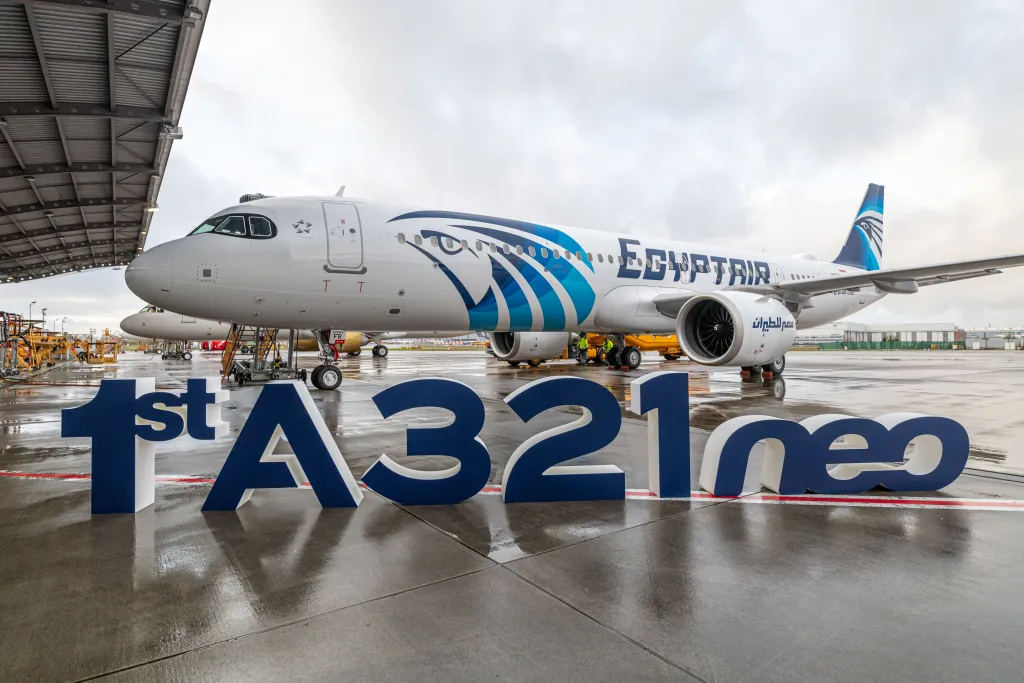
EGYPTAIR A321 NEO Sharklet 1.0.0

(2 reviews)

1 Screenshot

EGYPTAIR A321 NEO Sharklet 

Texture.MSR SU-GFV.rar

FSLabs A321-SL IAE

Copy Texture to file C:\Users\xxx\Documents\Prepar3D v5 Add-ons\FSLabs\SimObjects\Airplanes\FSLabs A321-SL IAE

User Feedback

Nadeem Zabaneh

Nadeem Zabaneh

   2 of 2 members found this review helpful 2 / 2 members

Hi Thanks for the repaint but the reg is actually SU-GBT not GFV with the neo features on the plane. Can you please update it?

Screenshot_1403.png

Screenshot_1404.png

Response from the author:

Sure, we will update more feature interior and exterior reg.

Account

Navigation

Search

Search

Configure browser push notifications

Chrome (Android)
  1. Tap the lock icon next to the address bar.
  2. Tap Permissions → Notifications.
  3. Adjust your preference.
Chrome (Desktop)
  1. Click the padlock icon in the address bar.
  2. Select Site settings.
  3. Find Notifications and adjust your preference.