Skip to content
View in the app

A better way to browse. Learn more.

Flight Sim Labs Forums

A full-screen app on your home screen with push notifications, badges and more.

To install this app on iOS and iPadOS
  1. Tap the Share icon in Safari
  2. Scroll the menu and tap Add to Home Screen.
  3. Tap Add in the top-right corner.
To install this app on Android
  1. Tap the 3-dot menu (⋮) in the top-right corner of the browser.
  2. Tap Add to Home screen or Install app.
  3. Confirm by tapping Install.

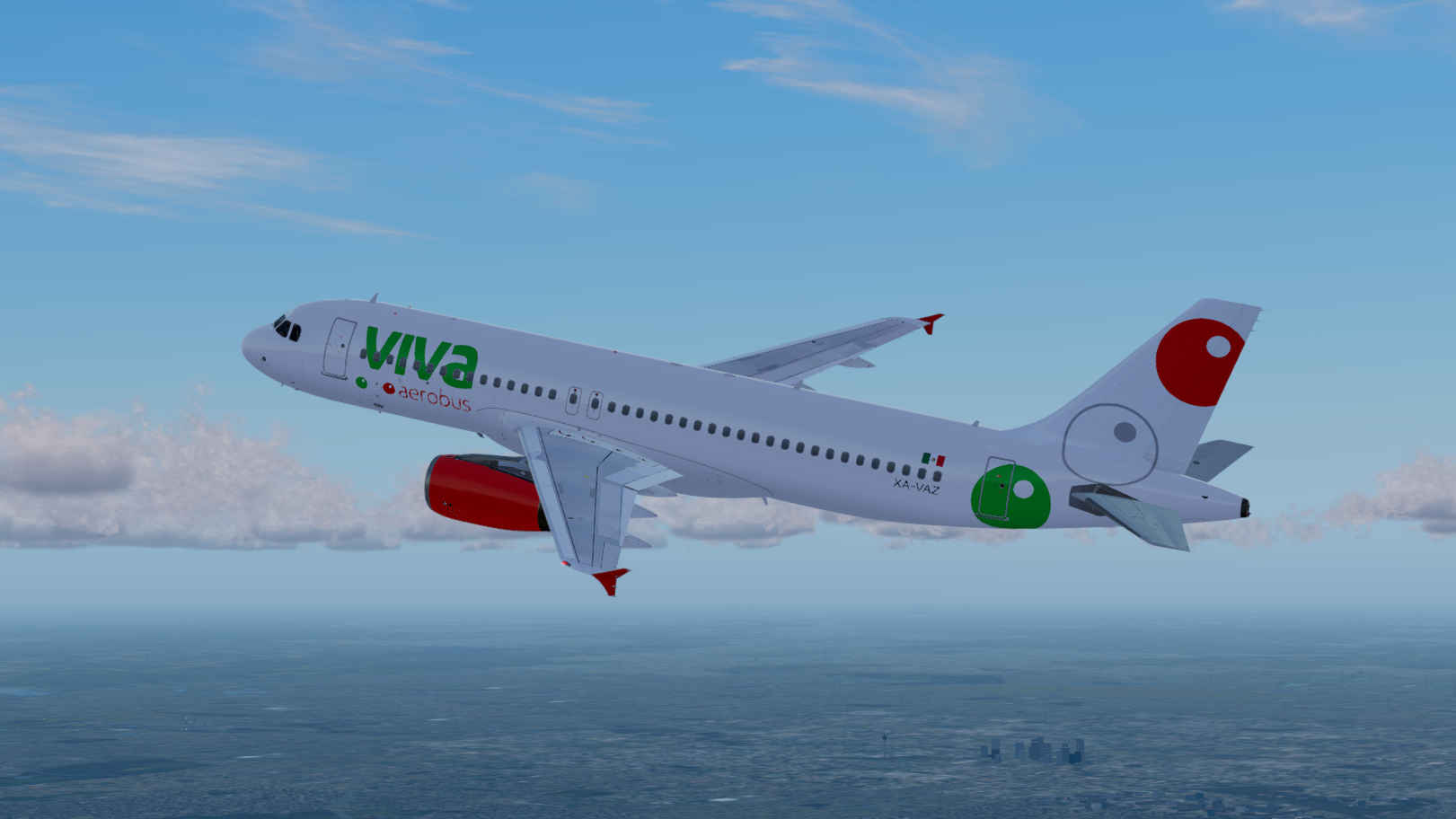
VIVAaerobus A320 IAE XA-VAZ PBR 1.0.0

(2 reviews)

3 Screenshots

VIVAaerobus


A320 IAE for FSLabs V5.0xx+ PBR Model Only
XA-VAZ based on the actual aircraft
Airframe Config File Included!

Serial number 2576
Type 320-232
First flight date 03/10/2005
Test registration F-WWBI
Seat Configuration Y180

Engines 2 x IAE V2527-A5
Delivered to VIVAaerobus 23/03/2016

INSTALLATION:
Just drop the Texture.VIV XA-VAZ & Airframe Configs Folder in the FSLabs A320 IAE Folder and you're good to go!

Enjoy!

Copyright: Camille Gibs Jr.  (TNCMAviator)

Edited by Camille Gibs Jr.
typo in the title

User Feedback

Thomas Hempel

Thomas Hempel

   1 of 1 member found this review helpful 1 / 1 member

Thanks for adding the data of the real counterpart. Much appreciated!

Armando_Perez

Armando_Perez

   1 of 1 member found this review helpful 1 / 1 member

Excellent repaint! Can you do a sharklets version of the Viva Aerobus Livery?

Response from the author:

eventually yes.. but the SL aircrafts they have.. their green bubble at the back are different, they wrap under the belly as one instead of 2 separate bubbles.. little more complicated for me.. still a beginner at painting hehe

Account

Navigation

Search

Search

Configure browser push notifications

Chrome (Android)
  1. Tap the lock icon next to the address bar.
  2. Tap Permissions → Notifications.
  3. Adjust your preference.
Chrome (Desktop)
  1. Click the padlock icon in the address bar.
  2. Select Site settings.
  3. Find Notifications and adjust your preference.