
Skip to content
View in the app

A better way to browse. Learn more.

Flight Sim Labs Forums

A full-screen app on your home screen with push notifications, badges and more.

To install this app on iOS and iPadOS
  1. Tap the Share icon in Safari
  2. Scroll the menu and tap Add to Home Screen.
  3. Tap Add in the top-right corner.
To install this app on Android
  1. Tap the 3-dot menu (⋮) in the top-right corner of the browser.
  2. Tap Add to Home screen or Install app.
  3. Confirm by tapping Install.

Laudamotion OE-LOM 1.0.0

(2 reviews)

1 Screenshot

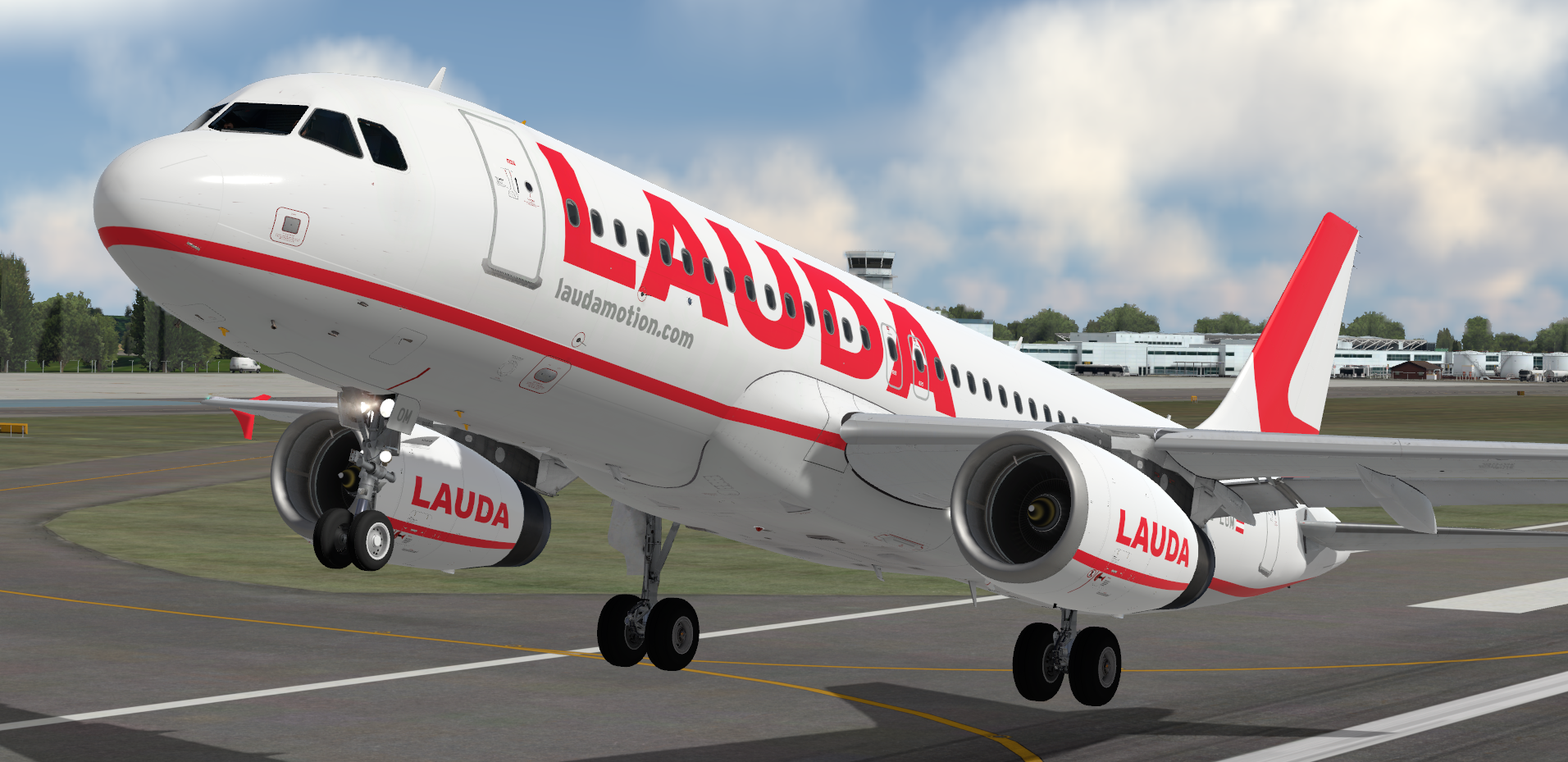
Laudamotion (OE/LDM) OE-LOM (Operated by Ryanair).

READ THESE INSTRUCTIONS CAREFULLY

*** FOR FSL A320 v5.0.100+ ONLY ***

This is a Laudamotion, registration OE-LOM (Operated by Ryanair) repaint for the FSLabs A320-X IAE.

IMPORTANT: This livery requires the following download to be installed to appear as intended https://forums.flightsimlabs.com/index.php?/files/file/2460-common-files-for-fsl-a320-v501100-custom-4k-pbr-paint-kit/.  Please ensure that you have installed this required package before attempting to install this livery.

To Install

  • Ensure that you have the ProfHBJT common files installed (can be found using the link above).
  • Drag both the 'Texture.LDM OE-LOM' AND 'Airframe Configs' folder into your FSLabs A320 IAE simobjects folder.


Features a complete overhaul of the default FSL A320 paint kit including:

  • Custom 4K textures with accurate seam panelling, fuselage section joins and rivets
  • Custom 4K metallic maps (PBR) with baked ambient occlusion (AO) effects
  • Custom 4K normal maps for fuselage, engines, wings and tail
  • Reworked landing gear including tyres and struts with custom PBR effects
  • Enhancements to aircraft overlay textures, including PBR effects
  • Custom dirt effects

Thanks to @Hugo Bicho @Daniel Du Preez and @John Tavendale who created the custom 4K paintkit used to make the livery.

If you like these liveries why not buy me a coffee.  All donations are heavily appreciated.


https://paypal.me/MatthewAshman

https://facebook.com/airformliveries

https://www.airformliveries.com
 

a2A0BLR82G.thumb.png.0a3bd451c81e4fd24301816f24b347bf.png

What's New in Version 1.0.0

Released

No changelog available for this version.

User Feedback

Matei Cojocaru

Matei Cojocaru


Thanks for making this livery - it looks stunning and I look forward to taking it on a spin out later this week!

One thing that I noticed was the wings and I only noticed this by grabbing an image to use for SimToolkitPro :D
I saw that in the image, the wings are white. I'll leave a link to the photo here: 
https://www.jetphotos.com/photo/9563675
This image was taken in December last year and credits go to Nigel Fenwick.

Maybe a small idea for a future update ;)

Kind Regards,
Matei

Peter Wawoczny

Peter Wawoczny

   1 of 2 members found this review helpful 1 / 2 members

hi,ist that correct? CFM? on review PIc i see IAE

Account

Navigation

Search

Search

Configure browser push notifications

Chrome (Android)
  1. Tap the lock icon next to the address bar.
  2. Tap Permissions → Notifications.
  3. Adjust your preference.
Chrome (Desktop)
  1. Click the padlock icon in the address bar.
  2. Select Site settings.
  3. Find Notifications and adjust your preference.
