
Skip to content
View in the app

A better way to browse. Learn more.

Flight Sim Labs Forums

A full-screen app on your home screen with push notifications, badges and more.

To install this app on iOS and iPadOS
  1. Tap the Share icon in Safari
  2. Scroll the menu and tap Add to Home Screen.
  3. Tap Add in the top-right corner.
To install this app on Android
  1. Tap the 3-dot menu (⋮) in the top-right corner of the browser.
  2. Tap Add to Home screen or Install app.
  3. Confirm by tapping Install.

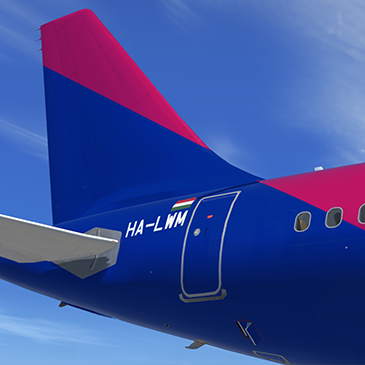
Wizz Air A320-200 HA-LWM 1.0.0

(2 reviews)

1 Screenshot

P3Dv4 v2.0.2.300+ ONLY.

You can simply drop the 'Texture.WZZ HA-LWM' folder into your sim and the aircraft will automatically be added to the vehicles list.

This livery is based off the real world Wizz Air livery, Reg : HA-LWM. 

Credits:

Credit goes to John Tavendale for the use of some of his A320 files.
 

Any issues, PM me or email me on my website : www.7x7pilot.weebly.com

User Feedback

Daniel Thomas du Toit

Daniel Thomas du Toit


Great livery! I noticed the tail is notably less reflective than the fuselage - just wanted to ask whether this was on purpose or not! (can't tell from irl photos)

Nemes Mark

Nemes Mark


It’s a really nice repaint ! Can you please create a repaint Wizz Air HA-LWI ? 

Account

Navigation

Search

Search

Configure browser push notifications

Chrome (Android)
  1. Tap the lock icon next to the address bar.
  2. Tap Permissions → Notifications.
  3. Adjust your preference.
Chrome (Desktop)
  1. Click the padlock icon in the address bar.
  2. Select Site settings.
  3. Find Notifications and adjust your preference.

