
Skip to content
View in the app

A better way to browse. Learn more.

Flight Sim Labs Forums

A full-screen app on your home screen with push notifications, badges and more.

To install this app on iOS and iPadOS
  1. Tap the Share icon in Safari
  2. Scroll the menu and tap Add to Home Screen.
  3. Tap Add in the top-right corner.
To install this app on Android
  1. Tap the 3-dot menu (⋮) in the top-right corner of the browser.
  2. Tap Add to Home screen or Install app.
  3. Confirm by tapping Install.

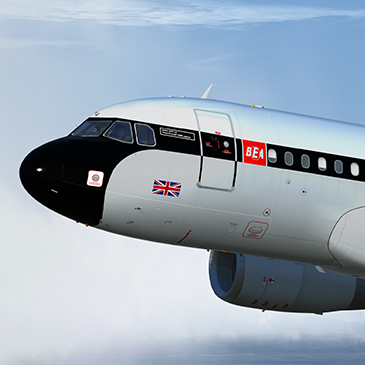
British Airways A319 G-EUPJ BEA Retro Livery 1.0.0

(10 reviews)

1 Screenshot

Repaint of British Airways A319 G-EUPJ in the BEA Retro Livery

P3Dv4 ONLY. You can simply drop the Texture.XXX folder into your sim and the aircraft will automatically be added to the vehicles list.

Created using highly detailed custom paint kit. 

If you like this paint and my other work then why not shout me a beer or cup of coffee?
https://www.paypal.me/texturesbytavers


G-EUPJ_2.png

G-EUPJ_1.png

What's New in Version 1.0.0

Released

No changelog available for this version.

User Feedback

Michael Houghton

Michael Houghton


I am sure I saw Airbus FTW on twitch flying this BEA Livery on P3D v 5 although it says it is for v4 only.

This was one of my favourite liveries on P3D v 4 having flown as a boy on BEA Comet 4's.

Can I confirn this will not work with P3D v 5.1

Brett Pyle

Brett Pyle


Best paintjob, thanks!


Timur Seliutin

Timur Seliutin

   2 of 2 members found this review helpful 2 / 2 members

Great work! Haven't installed if after the latest update though. Is it compatible? Thanks.

Response from the author:

Sure is!

Ulas Ates

Ulas Ates


Sublime rendition of the livery, thank you for sharing.

Christoph Sebek

Christoph Sebek


Oh boy, that is gorgeous. :wub:

Rob Jones

Rob Jones


A beautiful repaint, might be the best I've ever seen. Thank you.

David Norfolk

David Norfolk

   2 of 2 members found this review helpful 2 / 2 members

Love this paint, Tavers has some serious talent! 

Christian Erkens

Christian Erkens

   1 of 1 member found this review helpful 1 / 1 member

What an incredibly beautiful work! :wub:

Fritz_Essono

Fritz_Essono

   1 of 1 member found this review helpful 1 / 1 member

Absolute beauty. :wub:

Robert Ruprecht

Robert Ruprecht

   4 of 4 members found this review helpful 4 / 4 members

Brilliant rendition. Brings back fond memories of BritishEuropean , Thankyou for the effort.

Account

Navigation

Search

Search

Configure browser push notifications

Chrome (Android)
  1. Tap the lock icon next to the address bar.
  2. Tap Permissions → Notifications.
  3. Adjust your preference.
Chrome (Desktop)
  1. Click the padlock icon in the address bar.
  2. Select Site settings.
  3. Find Notifications and adjust your preference.

