
Skip to content
View in the app

A better way to browse. Learn more.

Flight Sim Labs Forums

A full-screen app on your home screen with push notifications, badges and more.

To install this app on iOS and iPadOS
  1. Tap the Share icon in Safari
  2. Scroll the menu and tap Add to Home Screen.
  3. Tap Add in the top-right corner.
To install this app on Android
  1. Tap the 3-dot menu (⋮) in the top-right corner of the browser.
  2. Tap Add to Home screen or Install app.
  3. Confirm by tapping Install.

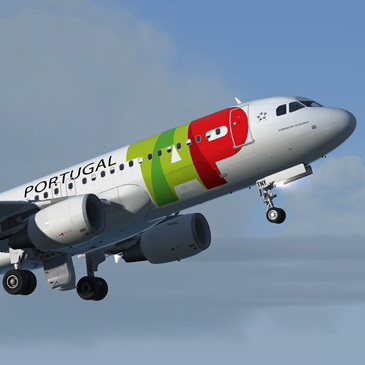
TAP A320 CS-TNY 1.0.0

(2 reviews)

1 Screenshot

Repaint of TAP A320 CS-TNY

P3D v4 compatibility only.  You can simply drop the Texture.XXX folder into your sim and the aircraft will automatically be added to the vehicles list.

Features

  • Created using detailed custom paintkit with custom bump textures
  • Updated Fresnel light maps meaning lower sun glare and accurate colour reproduction.
  • New wing textures (Thanks to Christian Mohr for these)
  • New engine inlet details (Thanks to Hugo Bicho for these)

CS-TNY.png


User Feedback

Christoph Sebek

Christoph Sebek


Really love your post retirement work, thanks for all the glorious repaints you do. :D

Pauga Kini

Pauga Kini


What can we say! Thank you John

Kind regards

Account

Navigation

Search

Search

Configure browser push notifications

Chrome (Android)
  1. Tap the lock icon next to the address bar.
  2. Tap Permissions → Notifications.
  3. Adjust your preference.
Chrome (Desktop)
  1. Click the padlock icon in the address bar.
  2. Select Site settings.
  3. Find Notifications and adjust your preference.

